本文经原作者授权转载,版权归原作者所有。原作者:实践哥MinLi(@MinLiBuilds)。查看原文 →
上周四晚上十一点多,我正准备关电脑。
瞄了一眼 git diff,发现 Claude 把我的 .env 改了。加了一行调试变量。本身没啥——但我当时连着生产库。
导读:用了仨月 Claude Code,之前天天帮它擦屁股。后来发现 Hooks 之后 10 分钟设好,之前手动检查的活全自动了。回不去了。原文 下面是翻译+实测。
你有没有过这种经历:让 Claude Code 做某件事,它就是不做?
你说"格式化代码"——它没做。你说"别碰那个文件"——它碰了。
你说"完成前跑一下测试"——它忘了。
原因在于,CLAUDE.md 只是一个建议。
Claude 读了它,大概 80% 的时间会遵守。但 Hooks 不同。它们是自动触发的动作——每当 Claude 编辑文件、执行命令或完成任务时,都会自动执行。
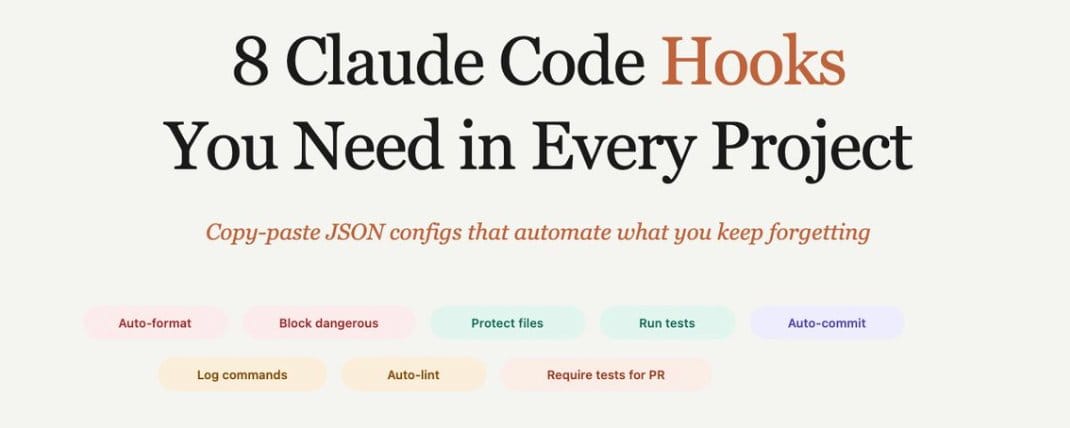
下面 8 个 Hooks,直接复制到 settings.json,设完就忘。

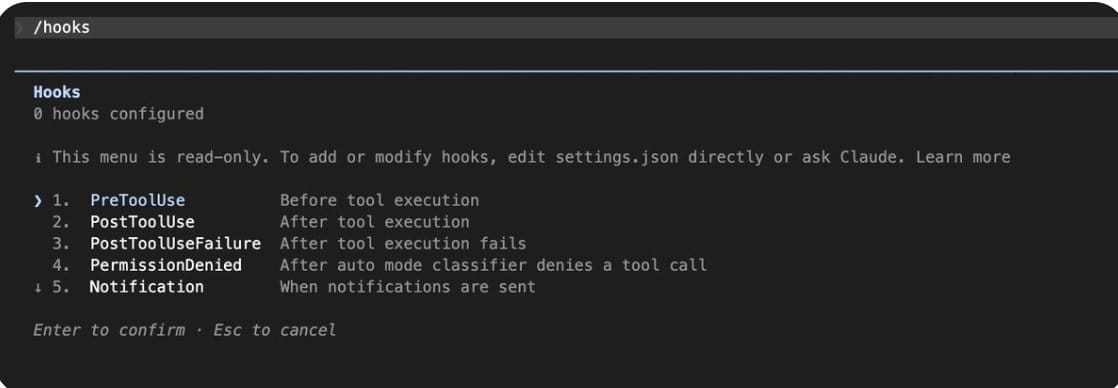
30 秒搞懂原理
Hooks = 绑在 Claude Code 动作上的脚本。设一次,后台一直跑。
- PreToolUse:Claude 动手之前。exit code 2 = 拦住。门卫。
- PostToolUse:Claude 动手之后。跑格式化、跑测试。质检员。
hook在哪:
.claude/settings.json         项目级(git 同步全组)
~/.claude/settings.json       用户级(所有项目)
.claude/settings.local.json   本地(不进 git)
文档:https://code.claude.com/docs/en/hooks
1. 自动格式化
{
  "hooks": {
    "PostToolUse": [
      {
        "matcher": "Write|Edit",
        "hooks": [
          {
            "type": "command",
            "command": "jq -r '.tool_input.file_path' | xargs npx prettier --write 2>/dev/null; exit 0"
          }
        ]
      }
    ]
  }
}
Python 换 black,Go 换 gofmt,Rust 换 rustfmt。
之前在 CLAUDE.md 里写了"永远运行 Prettier"。管用,但偶尔会忘。偶尔忘一次就够你在 PR 里丢一次脸了。
装完之后再没出过格式问题。所有项目标配,没有之一。
2. 拦截危险命令
Claude 真的会跑 rm -rf。概率低,但概率低跟零之间,隔着你的生产数据库。
创建.claude/hooks/block-dangerous.sh:
Create .claude/hooks/block-dangerous.sh:
#!/usr/bin/env bash
set -euo pipefail
cmd=$(jq -r '.tool_input.command // ""')

dangerous_patterns=(
  "rm -rf"
  "git reset --hard"
  "git push.*--force"
  "DROP TABLE"
  "DROP DATABASE"
  "curl.*|.*sh"
  "wget.*|.*bash"
)

for pattern in "${dangerous_patterns[@]}"; do
  if echo "$cmd" | grep -qiE "$pattern"; then
    echo "Blocked: '$cmd' matches dangerous pattern '$pattern'. Propose a safer alternative." >&2
    exit 2
  fi
done
exit 0
Then add to your settings.json:
{
  "hooks": {
    "PreToolUse": [
      {
        "matcher": "Bash",
        "hooks": [
          {
            "type": "command",
            "command": ".claude/hooks/block-dangerous.sh"
          }
        ]
      }
    ]
  }
}
再往 settings.json 添加:
{
  "hooks": {
    "PreToolUse": [
      {
        "matcher": "Bash",
        "hooks": [
          {
            "type": "command",
            "command": ".claude/hooks/block-dangerous.sh"
          }
        ]
      }
    ]
  }
}
exit code 2 = 出错拦截,0 = 放行,这个很简单,告诉 Claude 原因出错了,并让它换方案。
装了这个之后晚上终于能睡踏实了。之前有段时间做梦都梦到 Claude 跑了个什么奇怪的命令,醒来第一件事就是打开终端检查。你说荒不荒谬,一个程序员被自己的工具搞出 PTSD 了。
3. 敏感文件上锁
Claude 重构的时候顺手改了 package-lock.json。后面两个小时我都在跟诡异的依赖冲突搏斗,最后发现就是它动了不该动的文件。
#!/usr/bin/env bash
set -euo pipefail
file=$(jq -r '.tool_input.file_path // .tool_input.path // ""')

protected=(
  ".env*"
  ".git/*"
  "package-lock.json"
  "yarn.lock"
  "*.pem"
  "*.key"
  "secrets/*"
)

for pattern in "${protected[@]}"; do
  if echo "$file" | grep -qiE "^${pattern//\*/.*}$"; then
    echo "Blocked: '$file' is protected. Explain why this edit is necessary." >&2
    exit 2
  fi
done
exit 0
{
"hooks": {
"PreToolUse": [
{
"matcher": "Edit|Write",
"hooks": [
{
"type": "command",
"command": ".claude/hooks/protect-files.sh"
}
]
}
]
}
}停一下。
这个 Hook 干的事说白了就一个字:防。
有人会觉得矛盾——你用 AI 写代码,又防着它?你花钱请它来帮忙,结果第一件事是给它画红线?
但我越想越觉得,这可能就是我们这代程序员跟 AI 打交道的常态了。你离不开它,但你也不敢完全放手。就像你第一次把车钥匙交给刚拿驾照的孩子——你坐在副驾上,脚一直悬在刹车上方。
区别在于,Hooks 让你可以把脚从刹车上挪开。因为刹车已经自动化了。
顺便说:不会拖慢 Claude。毫秒级的事,实测过。
好,防灾到此为止。下面聊提效。
说真的,我一开始也觉得没必要搞这些。我的项目又不大,Claude 又挺聪明的。直到那天晚上 .env 的事。10 分钟设好这些 Hook,之后它们拦住的那一次事故,可能值你一整天。
顺便问一句——你用 Claude Code 多久了?有没有被它坑过?我特别好奇有多少人跟我有类似经历。
4 & 5. 测试这件事,我踩了两次坑才学乖
第一次:Claude 改完代码说"搞定了"。我信了。20 分钟后要 commit,测试全红。
第二次:Claude 写完功能一激动直接建了 PR。CI 全红。Reviewer 留了俩字:"认真?"
那个 Reviewer 是我 lead。当时恨不得找个地缝钻进去。
两个坑,两个 Hook。
改完代码自动跑测试:
{
  "hooks": {
    "PostToolUse": [
      {
        "matcher": "Write|Edit",
        "hooks": [
          {
            "type": "command",
            "command": "npm run test --silent 2>&1 | tail -5; exit 0"
          }
        ]
      }
    ]
  }
}
tail -5 只留最后几行,别让 200 行日志撑爆 context。
建 PR 前强制测试通过:
.claude/hooks/require-tests-for-pr.sh:
#!/usr/bin/env bash
set -euo pipefail

if npm run test --silent; then
  exit 0
else
  echo "Tests are failing. Fix all test failures before creating a PR." >&2
  exit 2
fi
{
"hooks": {
"PreToolUse": [
{
"matcher": "mcp__github__create_pull_request",
"hooks": [
{
"type": "command",
"command": ".claude/hooks/require-tests-for-pr.sh"
}
]
}
]
}
}Claude Code 创造者 Boris Cherny 说过,这种实时反馈能让输出质量翻 2-3 倍。我自己的体感是确实快了不少,Claude 修 bug 不再是"盲猜"了。
6. 自动 Lint + 7. 审计日志
这俩不像前面几个有什么惊天大坑,但不装你会在小地方持续被恶心到。
Lint:有一次 merge 之后队友给我发了个白眼 emoji,一个字没说。我看了半天才明白——ESLint 没跑,一堆规则违反。那种被无声审判的感觉,比被骂还难受。加上了:
{
  "hooks": {
    "PostToolUse": [
      {
        "matcher": "Write|Edit",
        "hooks": [
          {
            "type": "command",
            "command": "npx eslint --fix $(jq -r '.tool_input.file_path') 2>&1 | tail -10; exit 0"
          }
        ]
      }
    ]
  }
}
跟 #1 搭配:Prettier 管格式,ESLint 管规则。到手就是干净的。
日志:上个月 Claude 在某次会话里覆盖了一个配置文件,我三天后才发现。问题是我不知道是哪次会话、哪条命令干的。翻了一下午 commit 也没头绪。从那以后我装了这个:
.claude/hooks/log-commands.sh:
#!/usr/bin/env bash
set -euo pipefail
cmd=$(jq -r '.tool_input.command // ""')
printf '%s %s\n' "$(date -Is)" "$cmd" >> .claude/command-log.txt
exit 0
{
"hooks": {
"PreToolUse": [
{
"matcher": "Bash",
"hooks": [
{
"type": "command",
"command": ".claude/hooks/log-commands.sh"
}
]
}
]
}
}.claude/command-log.txt 加 .gitignore。出事打开,精确到秒。
8. 自动 commit
放最后是因为这个最有争议。在我团队引发了一场小战争。
反对派说:自动 commit?这是对 git 的亵渎。commit message 呢?review 呢?
我说:你是想要每个任务一个干净 commit,还是要一天结束时那个叫 "various changes" 的垃圾山?
吵了半天,最后怎么着?两派各用各的,谁也没服谁。到今天还是这样。
.claude/hooks/auto-commit.sh:
#!/usr/bin/env bash
set -euo pipefail
git add -A
if ! git diff --cached --quiet; then
  git commit -m "chore(ai): apply Claude edit"
fi
exit 0
{
"hooks": {
"Stop": [
{
"matcher": "",
"hooks": [
{
"type": "command",
"command": ".claude/hooks/auto-commit.sh"
}
]
}
]
}
}配合 claude -w feature-branch(worktrees),每个任务一个隔离分支。用过之后 git 历史第一次变得可读了。
你可以不喜欢。但建议先试一周再下结论。
完整 settings.json
这里把所有内容放一起,方便复制。
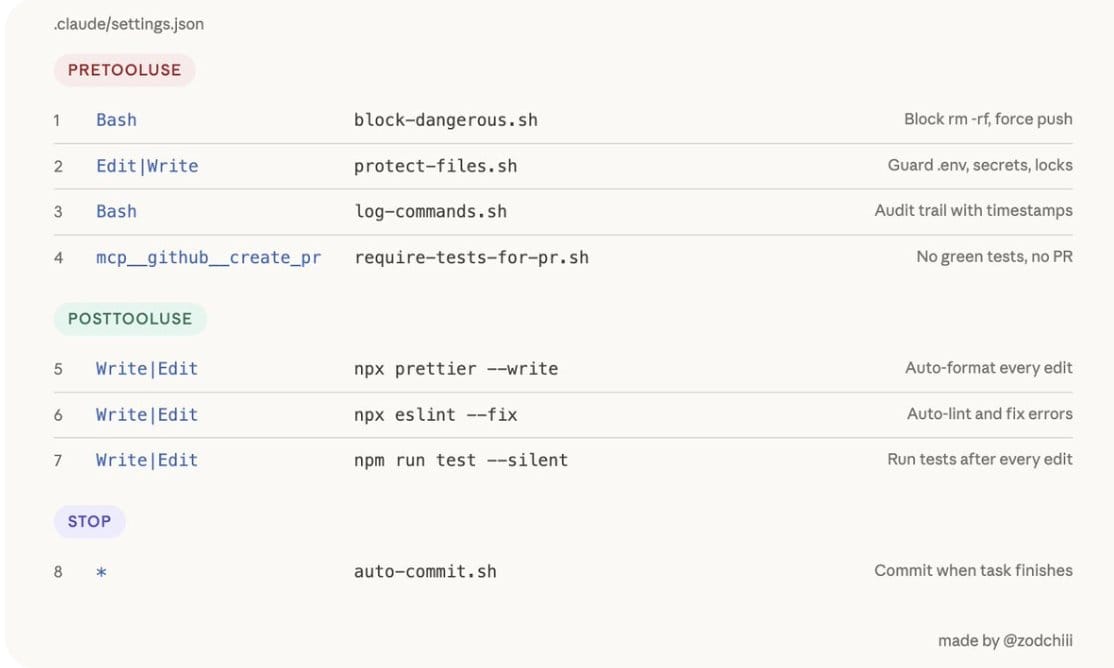
复制到 .claude/settings.json,脚本放 .claude/hooks/,chmod +x .claude/hooks/*.sh,commit。全组同步。
{
  "hooks": {
    "PreToolUse": [
      {
        "matcher": "Bash",
        "hooks": [
          { "type": "command", "command": ".claude/hooks/block-dangerous.sh" },
          { "type": "command", "command": ".claude/hooks/log-commands.sh" }
        ]
      },
      {
        "matcher": "Edit|Write",
        "hooks": [
          { "type": "command", "command": ".claude/hooks/protect-files.sh" }
        ]
      },
      {
        "matcher": "mcp__github__create_pull_request",
        "hooks": [
          { "type": "command", "command": ".claude/hooks/require-tests-for-pr.sh" }
        ]
      }
    ],
    "PostToolUse": [
      {
        "matcher": "Write|Edit",
        "hooks": [
          { "type": "command", "command": "jq -r '.tool_input.file_path' | xargs npx prettier --write 2>/dev/null; exit 0" },
          { "type": "command", "command": "npx eslint --fix $(jq -r '.tool_input.file_path') 2>&1 | tail -10; exit 0" }
        ]
      }
    ],
    "Stop": [
      {
        "matcher": "",
        "hooks": [
          { "type": "command", "command": ".claude/hooks/auto-commit.sh" }
        ]
      }
    ]
  }
}
今天先装 #1 和 #2。 就这俩,最常见的翻车已经干掉一大半。
实践哥:翻译完这里我突然想到一件事。
一年前我还在嘲笑那些不会用 AI 的同事。现在呢?我每天的工作流是:让 AI 写代码,然后检查 AI 写的代码,然后给 AI 装护栏防止它写出问题代码。你的 title 还是 Software Engineer,但你每天干的事越来越像 AI Babysitter。
Hooks 就是这个转变里唯一让我觉得舒服的部分——至少 babysitting 这件事,也可以自动化。
这个变化好不好?老实说我也没想明白。但它已经在发生了,不管你接不接受。
最后,那个问题我是真想听你的答案:该不该让 AI 自动 commit?
我见过两派人为这事差点闹翻。
A. 该,反正 squash merge 时会压掉,过程 commit 无所谓
B. 不该,commit 是工程师最后的体面
C. 我有更野的操作——说来听听